How to Create a Risk Register: Template, Example and Step-by-Step Guide
What a risk register is, the 12 columns it needs, how to fill and score it, a filled example, strategic vs project registers, and a free template.
A risk register is a table that lists the risks facing an organisation, project or strategy, together with who owns each one, how serious it is and what is being done about it. It turns a vague worry such as "we depend too much on one supplier" into a named, scored item with an owner, an action and a review date. A good register is short enough to be read and current enough to change decisions.
This guide shows the columns a useful register needs, how to fill it in step by step, how to score risks, how strategic, operational and project registers differ, and a filled example you can copy. You can download the free risk register template (Excel), with dropdowns and an automatic risk score.
What a risk register is for
The UK government's Orange Book defines risk as "the effect of uncertainty on objectives", and says risk is usually expressed in terms of causes, potential events and their consequences. A risk register is where that thinking is written down so that it can be tracked.
It has three jobs:
- Make risks visible, so they are discussed before they happen rather than after.
- Give every important risk one owner who is expected to act.
- Create a record that leadership can review on a fixed rhythm.
A register is not the same as a heat map. The register holds the detail. The risk heat map is a picture of the register that shows where the serious risks sit.
The risk register template: 12 columns
These are the columns we recommend. They match the downloadable template.
| # | Column | What goes in it | Example |
|---|---|---|---|
| 1 | Risk ID | A short unique code | R-01 |
| 2 | Risk description | Cause, event and consequence in one sentence | Because one supplier makes 70% of our parts, a failure at that supplier could stop production for weeks |
| 3 | Category | A type from your agreed list | Commercial |
| 4 | Risk owner | One named person, not a team | Head of Operations |
| 5 | Likelihood | 1 (rare) to 5 (almost certain) | 3 |
| 6 | Impact | 1 (minor) to 5 (severe) | 4 |
| 7 | Risk score | Likelihood x impact, 1 to 25 | 12 |
| 8 | Response | Reduce, avoid, share or accept | Reduce |
| 9 | Actions | What will be done, specifically | Qualify a second supplier for the top 10 parts |
| 10 | Action due date | When the action should be complete | 31 March |
| 11 | Status | Open, in progress or closed | In progress |
| 12 | Next review date | When the owner will look at it again | 15 February |
Some teams add optional columns: the objective or initiative the risk threatens, the score after actions (often called residual risk), and an early warning sign that would trigger a review. For a strategic register, the objective column is worth adding, because it ties each risk to something leadership cares about.
Write the description as cause, event, consequence
The description is the column most often done badly. "Supplier risk" or "cyber" is a topic, not a risk. The Orange Book describes a risk in three parts: a cause that can give rise to it, an event, and the consequences should the event happen. A simple pattern is:
"Because of [cause], [event] may happen, which would lead to [consequence]."
Written this way, the owner knows what to watch (the cause), what to prevent (the event) and what to limit (the consequence).
How to create a risk register step by step
1. Set the scope and the time horizon
Decide what the register covers: the whole organisation, one strategy, or one project. Then fix the period, such as the next 12 months. "Likely" means nothing until you say within what time.
2. Agree categories and scoring scales first
Pick a short list of categories before you list risks. The Orange Book's example categories include strategy, people, governance, technology, operations, legal, financial, commercial, information, security, project and reputational risks. Most smaller organisations use six to eight. Define what each likelihood and impact level means in plain terms, so that a 4 means the same thing to everyone.
3. Identify risks with the people who see them
Run a short workshop with leadership and the people closest to the work. Start from your objectives and ask what could stop each one. Your SWOT threats and PEST analysis are good inputs. Aim for 10 to 25 real risks, not 80 generic ones.
4. Name one owner per risk
The owner is the person who will notice if the risk grows and who has the authority to act. A committee cannot own a risk.
5. Score likelihood and impact
Rate each risk from 1 to 5 on both scales and multiply them. Score together, because people from different functions will disagree, and that discussion is often the most useful part of the exercise.
6. Choose a response and specific actions
For each risk above your action line, decide the response and write actions that someone can actually do by a date. "Monitor closely" is not an action.
7. Set review dates and put them in the calendar
Every open risk gets a next review date. High risks are reviewed more often than low ones.
How to score risks in a risk register
A 5x5 scale is the most common choice. Likelihood and impact each run from 1 to 5, and the score is the product, from 1 to 25.
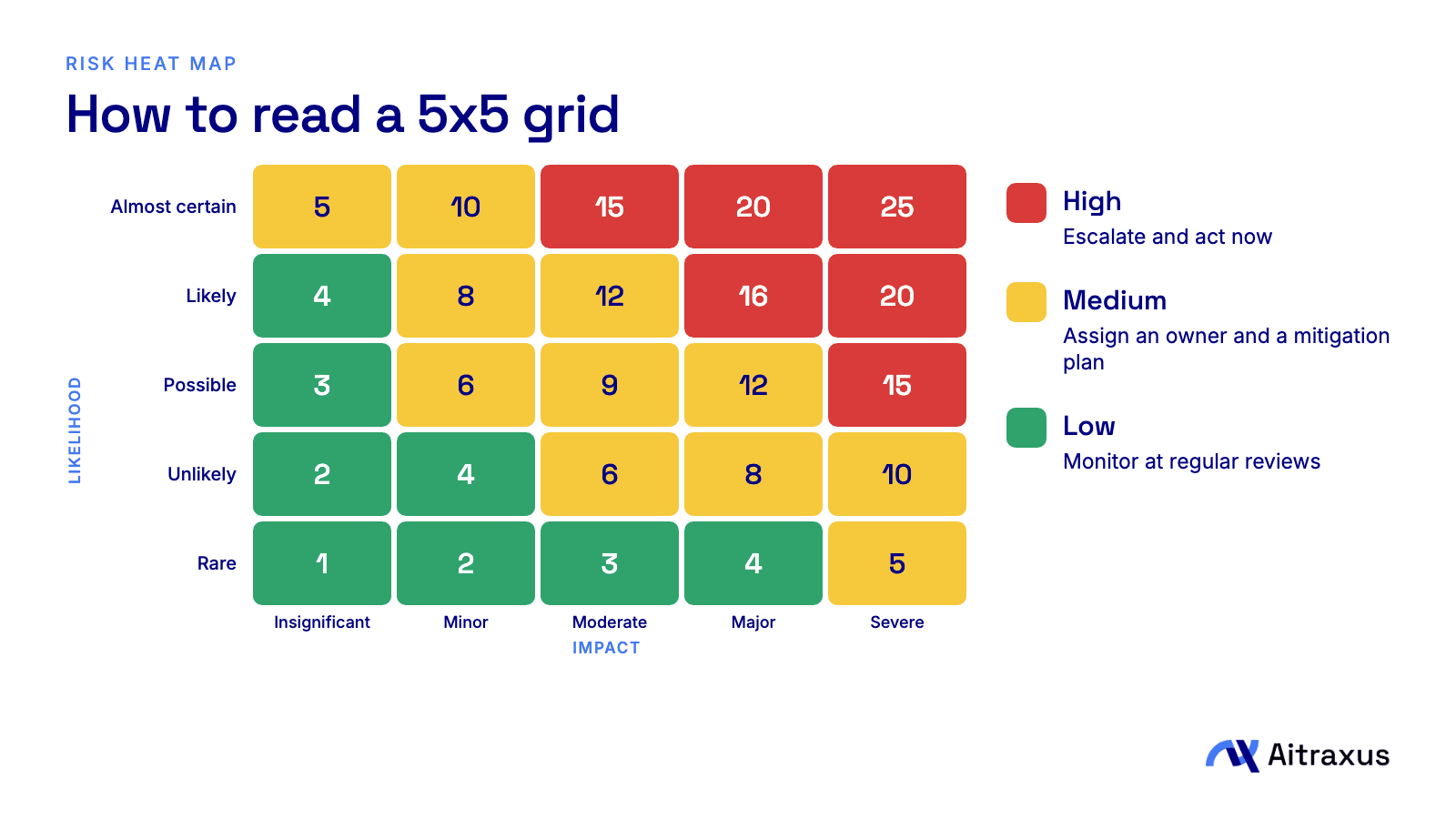
These bands are one common starting point, not a standard. Set your own and agree them with leadership.
| Score | Level | Typical response |
|---|---|---|
| 1 to 4 | Low | Accept and check at regular reviews |
| 5 to 12 | Medium | Owner and action plan required |
| 15 to 25 | High | Escalate to leadership, act now |
Our guide to risk heat maps explains how to define each level, how risk appetite moves the boundaries, and the known weaknesses of scoring with ordinal scales.
Choosing a response
| Response | Meaning | Example |
|---|---|---|
| Reduce | Lower the likelihood, the impact or both | Train a second person on a critical system |
| Avoid | Stop or change the activity that creates the risk | Do not enter a market until a licence is granted |
| Share | Move part of the risk to another party | Insurance, or a contract clause with a supplier |
| Accept | Keep the risk knowingly, within appetite | A low risk that costs more to treat than to bear |
The Orange Book lists similar options and adds one that is easy to forget: taking or increasing a risk in order to pursue an opportunity.
Strategic vs operational vs project risk registers
Many organisations keep more than one register. They differ in who owns them and how often they are reviewed.
| Strategic risk register | Operational risk register | Project risk register | |
|---|---|---|---|
| Covers | Risks to the strategy and long-term objectives | Risks to day-to-day processes and services | Risks to one project's time, cost and quality |
| Typical owner | Executive team, overseen by the board | Department heads | Project manager |
| Number of risks | Usually 10 to 20 | Can be longer | Depends on the project |
| Review cadence | Quarterly, with a monthly check on high risks | Monthly | Weekly or at each project meeting |
| Example risk | A regulation change makes our core service unviable | Payroll is run late because of a system failure | The new system goes live three months late |
The registers should talk to each other. A project risk that grows large enough to threaten a strategic objective is escalated to the strategic register. The Orange Book describes this flow of escalation and aggregation from lower levels up to the top.
Risk register example: a filled template
This example is fictional, for illustration. It is a strategic risk register for a 60 person software company that plans to enter a new country.
| ID | Risk description | Category | Owner | L | I | Score | Response | Actions | Due | Status | Review |
|---|---|---|---|---|---|---|---|---|---|---|---|
| R-01 | Because two senior engineers hold most product knowledge, one of them leaving could delay the new release by a quarter | People | CTO | 3 | 4 | 12 | Reduce | Document core modules, pair a second engineer on each | 30 Apr | In progress | 15 Mar |
| R-02 | Because licensing rules in the new country are under review, our licence could be delayed, which would push entry back by six months | Strategy | CEO | 3 | 5 | 15 | Reduce | Engage local adviser, prepare a reduced launch that needs no licence | 31 Mar | Open | 1 Mar |
| R-03 | Because 45% of revenue comes from one client, losing them at renewal would cut cash below our safety level | Commercial | Sales Director | 2 | 5 | 10 | Reduce | Executive sponsor for the account, target three new mid-size clients | 30 Jun | In progress | 1 Apr |
| R-04 | Because we host all data with one provider in one region, an outage could stop service for all clients | Technology | Head of IT | 2 | 4 | 8 | Share | Add backup region, check provider's service credits in contract | 31 May | Open | 1 Apr |
| R-05 | Because the office lease ends next year, a large rent increase could raise fixed costs | Financial | CFO | 3 | 2 | 6 | Accept | Review options six months before lease end | 30 Sep | Open | 1 Jun |
Only R-02 is in the high band, so it is the one leadership discusses at every monthly meeting. Note that each description names a cause, an event and a consequence, and each risk has one person, not a team, as owner.
How often to review a risk register
There is no single required cadence, but a rhythm that works for many small and mid-sized organisations is:
- Weekly or per meeting: project risk registers.
- Monthly: high risks on the strategic register, and the operational register.
- Quarterly: the full strategic register as part of your quarterly strategy review.
- Annually: categories, scoring scales and appetite, during the planning cycle.
The Orange Book says the outcome of risk evaluation should be regularly reviewed and revised because risks change. Review out of cycle when something happens: a key person resigns, a regulation is announced, a large client gives notice.
Common mistakes
- Listing topics ("IT", "competition") instead of cause, event and consequence.
- Too many risks. A register of 80 items is not read, so none of them is managed.
- Owners who are teams or committees, so nobody acts.
- Actions such as "monitor" with no date and no deliverable.
- Scoring once and never again, so the register describes last year.
- Keeping the register in a separate file from the strategy and the budget, so risks never affect where money goes.
- Closing risks because the action is done, without checking whether the score actually fell.
Risk register checklist
- The scope and time horizon are written at the top.
- Categories and the 1 to 5 scales are defined in plain words.
- Every description has a cause, an event and a consequence.
- Every risk has one named owner.
- Every risk above the action line has a dated, specific action.
- Every open risk has a next review date.
- High risks are reviewed monthly, the full register quarterly.
- Strategic risks are linked to the objectives they threaten.
Build your risk register and heat map in Aitraxus
In Aitraxus the risk register sits inside your strategy project, next to goals, initiatives and the budget. Each risk has a category, an owner, a status and a likelihood and impact on a 1 to 5 scale, and the heat map updates from the register as you edit it.
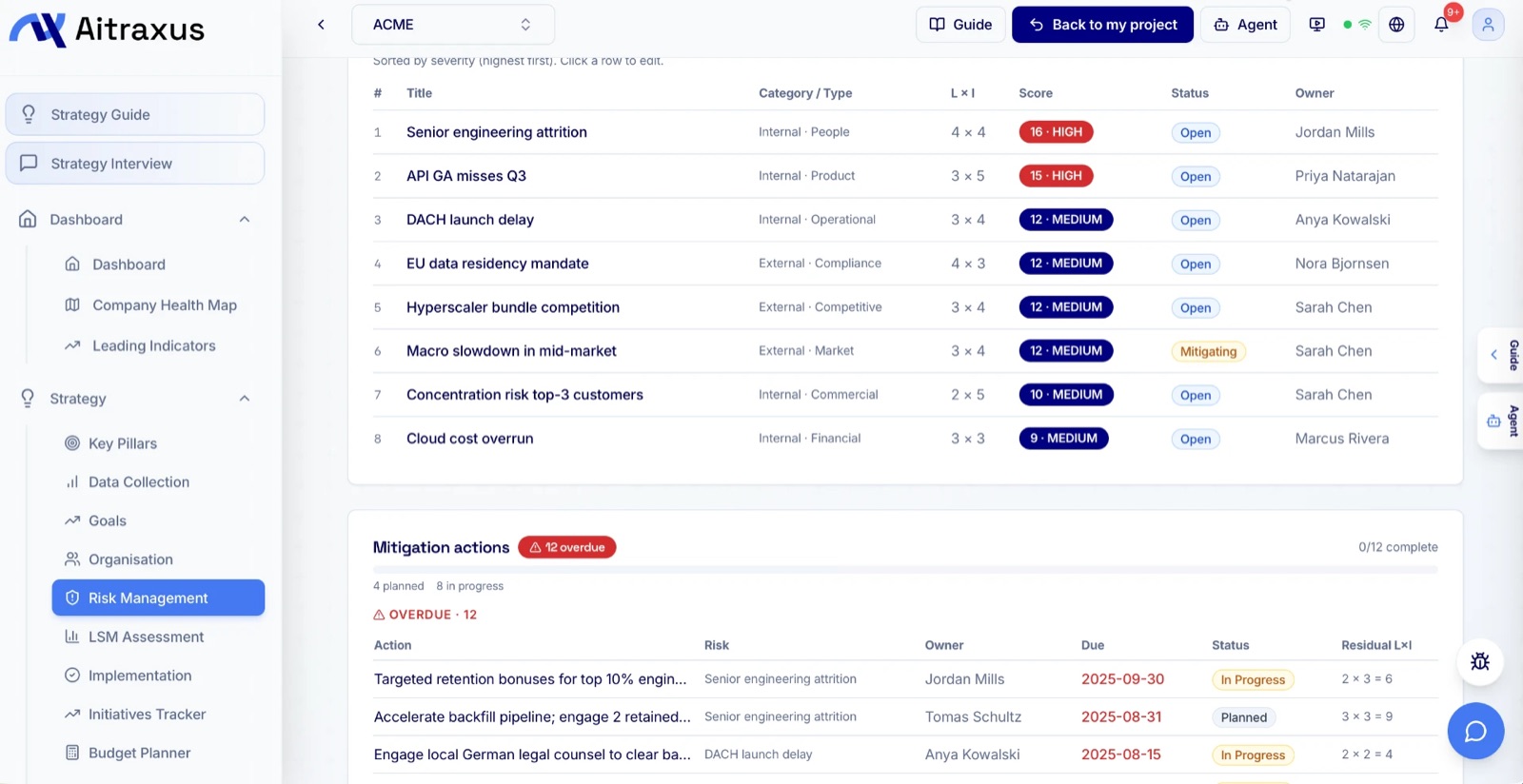
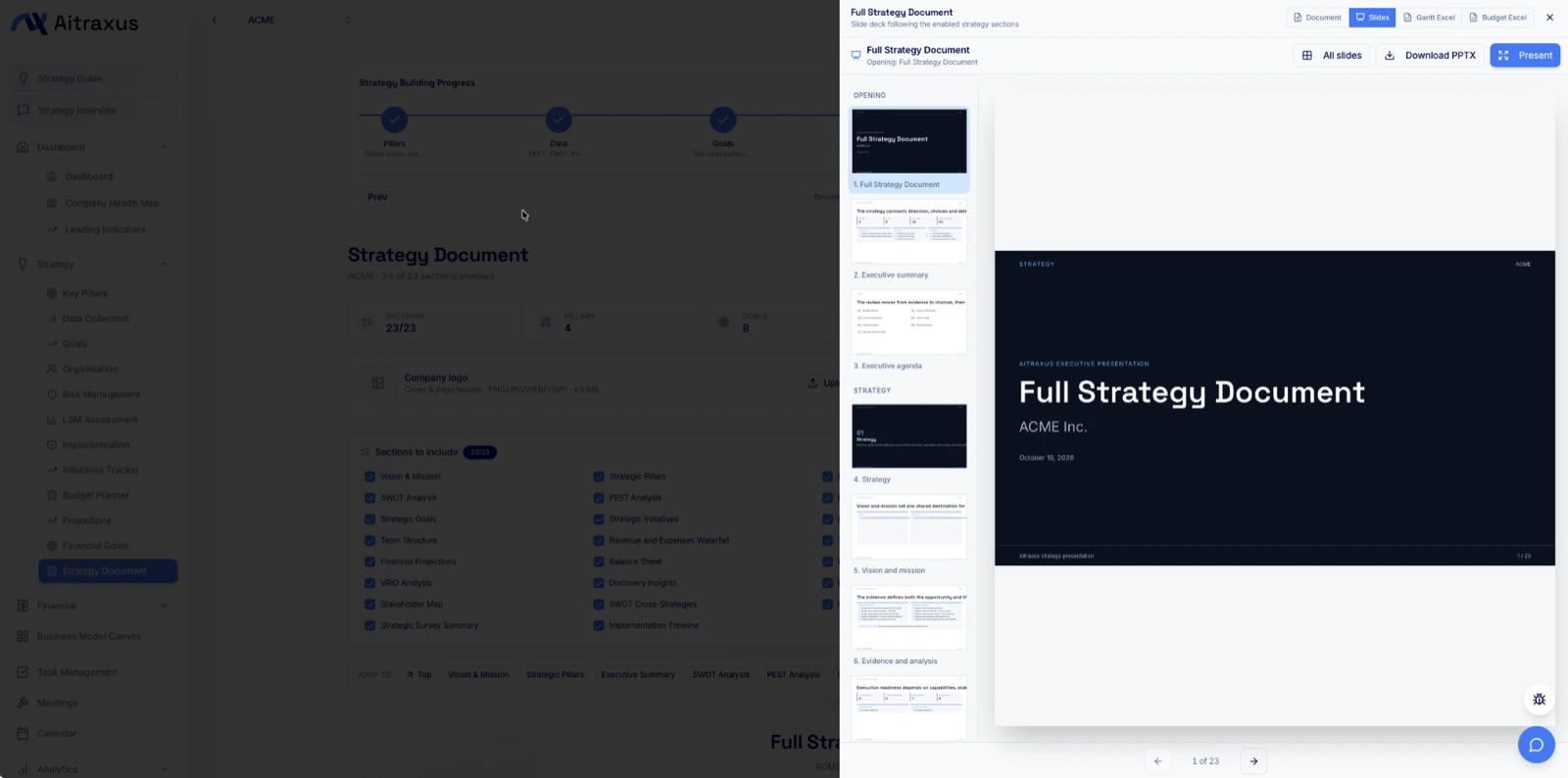
When you are stuck on what to do about a risk, AI can suggest mitigations as a starting point. You choose which to keep, edit them, and assign each action an owner and a due date. Because reports are generated from live project data, the board-ready material you export to PowerPoint, PDF or Word draws on the same register the team works from, not a copy pasted in the night before.
Sources
- HM Treasury, The Orange Book: Management of Risk, Principles and Concepts, updated May 2023
- ISO/TC 262, ISO 31000:2018 Risk management, Guidelines
- COSO, Enterprise Risk Management: Integrating with Strategy and Performance, 2017
Frequently asked questions
What should a risk register include?
At minimum: a risk ID, a description in cause, event and consequence form, a category, one owner, likelihood, impact, score, the response, specific actions with a due date, a status and a next review date.
How do you create a risk register?
Set the scope and time horizon, agree categories and scoring scales, identify risks with the people who see them, name one owner per risk, score them, choose a response and actions, then put review dates in the calendar.
What is a strategic risk register?
It is a short register of the risks that could stop an organisation reaching its strategic objectives. It is owned by the executive team, overseen by the board and usually reviewed quarterly.
How is a risk score calculated?
The most common method multiplies likelihood by impact, each rated 1 to 5, to give a score from 1 to 25. The score is then grouped into bands, such as low, medium and high, that decide the response.
How often should a risk register be updated?
Review high risks monthly and the full strategic register quarterly, and update it straight away when something significant changes.
Try Aitraxus free and open the ACME demo project to see a scored risk register, its heat map and AI suggested mitigations.